

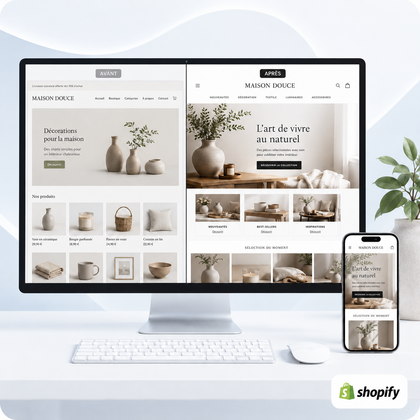




Modernizing does not mean erasing everything that exists
An old Shopify store can be upgraded by retaining its products, useful content, data and important URLs. The work consists of identifying the foundations to preserve and then reconstructing the areas that have become inconsistent.
The safest method follows seven steps: audit, perimeter backup, architecture clarification, visual modernization, mobile adaptation, technical cleaning, then recipe before posting online.

Audit the store before touching on the design
Starting with colors or the home page often leads to moving problems. The audit must distinguish what concerns appearance, background, catalog, technique and internal organization.
Which still works
Locate the pages viewed, useful collections, content that answers questions and functions actually used. These items do not need to be replaced without reason.
Which slows down visitors
Test the menu, search, filters, product sheets, cart and trust information on computer and phone. Note the efforts required at each step.
Which complicates management
List duplicate applications, templates that are difficult to modify, pages built without common logic, and fixes that come up regularly.
What has changed in the company
The catalog, customer base, range level and commercial priorities may have evolved. The new store should reflect current activity, not that of the first launch.
To learn more about this step, see 15 Signs of a Shopify Store Becoming Unprofessional and the guide allowing you to know if a redesign is necessary.
Modernize an old Shopify store in seven steps
Define the perimeter
Choose the pages, product models, collections and functions to rework. Separate essential corrections from improvements that may wait.
Inventory the elements to keep
Document useful URLs, products, menus, content, settings, applications and tracking data. This list serves as a safeguard during the redesign.
Simplify architecture
Rearrange menus and collections according to current customer expectations. Remove redundant categories and unnecessarily deep paths.
Create a coherent visual system
Define colors, typographies, spacing, buttons, maps and uses of images. The goal is reproducible consistency, not different decoration on each page.
Rethink key models
Work on the homepage, products, collections and information pages as a whole. Arguments, evidence and actions must follow a stable hierarchy.
Clean functions and mobile
Evaluate apps, reduce unnecessary widgets, and check the readability of menus, variations, forms, and buttons on the small screen.
Test before the switchover
Control links, content, variations, delivery, payment, emails and redirects. The new version must be validated as a real customer journey.
About theme: it can be improved or replaced depending on its limits. Check out the comparison change theme or improve existing one before deciding.
Which areas should be modernized as a priority?
| Area | Useful modernization | To preserve | Checkpoint |
|---|---|---|---|
| Mobile and navigation | Simplified menus, readable buttons, compact sections | Categories and benchmarks understood by customers | Find and open a product effortlessly |
| Home | Promise, priority categories and reinsurance | Content and evidence still relevant | Understand the offer in moments |
| Product sheets | Gallery, information, variants and hierarchical purchasing | Reliable data, references and descriptions | Compare and choose without missing information |
| Collections | Consistent titles, filters, visuals and content | Useful URLs and powerful groupings | Explore a catalog without confusion |
| Trust | Delivery, returns, contact and accessible information | Exact conditions and verifiable commitments | Respond to objections before shopping cart |
Sensitive elements to protect during the redesign
Successful modernization isn't just about how it looks. It must preserve commercial continuity and avoid inadvertently removing useful elements.
URLs and existing SEO
Avoid changing addresses unnecessarily. When a URL needs to evolve, plan for redirection and control internal links that pointed to the old page.
Product data and variants
Prices, references, stocks, weights, options and assignments to collections must be checked. A more modern rendering does not compensate for data that has become incorrect.
Operational settings
Payment, delivery, taxes, notifications and domains deserve separate verification. Don't assume they remain the same after each change.
Applications and integrations
Identify the function, cost and dependency of each tool. Removing an app without understanding its role can affect a page or automation.
Safety principle: preparing the new version in a work environment when theme organization allows it, then switching after recipe, reduces improvised changes to the active store.
Which service should I choose to modernize the store?
The indicative deadlines range from 5 to 21 working days depending on the formula and begin after validation of the quote and receipt of the necessary access and content. Shopify subscription, themes, applications and paid licenses remain separate unless otherwise stated in writing.
Essential checks after modernization
- The pages and models provided in the scope are validated.
- Products, variants, prices, stocks and collections are controlled.
- Old useful URLs are retained or redirected.
- Important menus, search, filters and links work.
- The rendering is reread on computer and telephone.
- Delivery, returns, payment and contact details are available.
- A test command is carried out end-to-end.
- Emails and notifications use the right information.
- The necessary applications and integrations are checked.
- Future improvements are separated from blocking fixes.
To estimate the budget, also consult how much does a Shopify redesign cost and the detailed page of professional Shopify store redesign.
FAQs about upgrading an old Shopify store
Should you change the theme to modernize Shopify?
Not systematically. A theme that is still adapted can be improved. Replacement becomes relevant when its structure, performance or possibilities no longer respond to the project.
Can we keep products and orders?
A theme or page redesign does not necessarily involve recreating products and orders. However, the scope and sensitive data must be inventoried and verified.
How to avoid losing existing SEO?
Keep useful URLs as much as possible, prepare necessary redirects, and control the titles, content, and internal links of reworked pages.
Can the store remain accessible during the work?
The progress depends on the theme and organization of the store. When possible, the new version is prepared without disrupting the active store.
What is the difference between modernization and complete overhaul?
A modernization can target a few models and largely preserve the structure. A complete overhaul takes on a broader scope when the route, catalog and design have become inconsistent.
Do all apps need to be deleted?
No. Each application must be evaluated according to its function, cost, use and effects. Useful tools are retained; Unnecessary duplicates or widgets can be removed with caution.
How much does it cost to modernize an old store?
SiteQuiVend offers the redesign of five pages or key models from €990. Published plans go up to €2,990, then a tailor-made proposal starts at €3,990.
Does modernization guarantee more sales?
No. It can improve the clarity, consistency and usage of the store, but the results also depend on products, prices, traffic, supply and commercial follow-up.
