

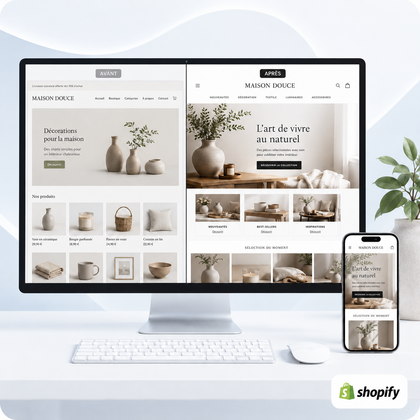




When redesigning an online store, you must retain everything that already has commercial, operational or SEO value: the domain name, powerful URLs, catalog, customer and order data, useful content, business settings, measurement tools and brand elements that are still relevant. The objective is not to start from scratch, but to modernize the store without losing what you have acquired.
However, a redesign should not reproduce confusing navigation, dated design or unnecessary applications. Classify each item into three categories: store, improve or replace.

Are you preparing a Shopify redesign?
An initial diagnosis makes it possible to identify what needs to be protected, simplified or rebuilt before touching the store.
Redesign without erasing what works
A successful redesign starts from what already exists. Inventory the pages that attract traffic, the products that sell, the features used and the essential settings. This analysis avoids keeping everything out of caution or deleting everything in the name of novelty.
The 8 categories of elements to keep
Useful domain name and URL
The domain, indexed URLs, and pages that receive links or traffic constitute SEO capital. Keep addresses when they remain consistent. If a URL changes, plan for a permanent redirection to the relevant new page.
Catalog and product data
Keep titles, relevant descriptions, actionable images, variations, SKU references, prices, stocks, weights, collections and reliable metadata. Take advantage of the redesign to correct duplicates and outdated information, without blindly rewriting the worksheets.
Customers, orders and history
Customer accounts, addresses, orders, credits and data necessary for after-sales service have operational value. In the existing Shopify store, you can modernize the interface without unnecessarily creating a new store.
Already efficient content
Category pages, guides, FAQs and articles can continue to attract and reassure. Evaluate them through traffic, conversions and their real usefulness. The best content must remain accessible and be better integrated into the new journey.
Relevant brand identity
Logo, palette, typographies, iconography, editorial tone and photographs are not automatically to be thrown away. Keep the codes recognized by your customers if they still serve the positioning; make them evolve if they harm readability or appear inconsistent.
Commercial settings
Document payments, taxes, delivery areas and rates, markets, currencies, notifications, sender domains and policies. These settings are often invisible in the design, but an error can prevent an order or generate a bad customer promise.
Measurement and compliance
Maintain access to useful analytics tools, pixels, conversion events, consent and tags. After going live, test their triggering: the presence of a code does not guarantee reliable data.
Essential apps and integrations
Distinguish between essential applications - reviews, logistics, billing, subscription or support - redundant modules. Check their compatibility with the new theme and their costs. A redesign is also an opportunity to reduce technical debt.
What to keep the same, adapt or replace?
The decision depends on evidence, not just aesthetic preference. Here is a practical grid to arbitrate the main elements.
| Element | Keep if... | Adapt or replace if... |
|---|---|---|
| Structure of URLs | pages are indexed, relevant and generate traffic | the structure is inconsistent, with redirects prepared |
| Navigation | customers quickly find products and information | it is too long, ambiguous or ineffective on mobile |
| Contents | they respond to an intention and support sales | they are duplicated, dated or without a clear role |
| Applications | they fulfill a necessary and measurable function | they duplicate, slow down or are no longer used |
| Design | the codes reinforce recognition and remain readable | they create confusion or degrade the mobile experience |
Essential SEO precautions before going online
SEO risk appears especially when useful pages disappear, their URLs change without redirection or the internal mesh is broken. Before redesigning, export the URLs and locate important pages.
- Keep titles and meta descriptions effective, then improve them only if necessary.
- Match each old deleted URL to the nearest new destination.
- Preserve unique texts, alt tags and structured data that are still accurate.
- Recontrol internal links, canonicalization, indexing and sitemap.
- Compare traffic and errors after launch to quickly correct anomalies.
To frame this phase, also consult our guide on preparing for a Shopify redesign without losing sales.
What needs to be preserved on the operations side
A store can appear visually successful while still being fragile when ordering. Test the actual routes: basket, discounts, variants, delivery, payment, confirmation, emails, tracking, refund and forms.
Access by service providers and employees must also be re-examined. Keep necessary accounts, remove those that are no longer needed, and document who owns each tool. Finally, back up or export critical information before significant changes, even when they take place in the existing store.
Which service should you choose for your store?
SiteQuiVend offers Shopify redesigns from €990. The plans currently presented range from 5 to 20 pages, with indicative deadlines of 5 to 21 working days depending on the scope. Shopify subscriptions, paid themes, applications and licenses remain separate.
Essential, Balance, Growth or Premium formulas depending on the number of pages, products and collections to be included.
For a more advanced scope requiring a dedicated estimate after needs analysis.
Full prices, content and limits are detailed on the page Professional Shopify store redesign. If the store mainly requires continuous corrections, consult it instead maintenance and web support.
Need to frame the right level of intervention?
Tell us about your store and your priorities. We will direct you towards a redesign, a targeted intervention or a tailor-made quote, without pushing you towards an unnecessary scope.
Checklist: the 12 points to secure
Before starting the redesign
- Inventory all current URLs
- Identify the pages that generate traffic and sales
- Export catalog and critical data
- List applications and integrations
- Document payments, taxes and delivery
- Maintain access to measurement tools
- Decide what to keep, improve or remove
- Prepare the necessary redirects
- Validate the content and media to be taken back
- Test the complete purchasing journey
- Control mobile, speed and accessibility
- Plan for post-launch checks
FAQs on what to keep during a redesign
Should we keep all old pages?
No. Keep pages useful, indexed, visited or necessary for the customer journey. Merge or remove weak content, but plan for redirection when an old URL still has a value.
Can you change Shopify themes without losing products?
Yes. In the same Shopify store, changing themes does not normally delete the catalog or orders. Sections, customizations and applications must nevertheless be checked and reconfigured in the new theme.
Should we keep exactly the same URLs?
Ideally, keep relevant URLs that are already indexed. When a change is warranted, create a permanent redirect to the nearest replacement page.
Is customer data retained during a redesign?
A redesign carried out on the existing store allows native store data to be retained. In the event of migration to another platform or a new store, a specific transfer plan and controls are necessary.
Should we keep all Shopify apps?
No. Keep those that meet a real business need, are compatible and justify their cost. Remove duplicates only after checking their dependencies and impact on the theme.
What to do with old blog posts?
Preserve useful articles and URLs that attract traffic. Update dated information, improve internal links, and merge content that is too close when it provides clarity.
How to avoid a drop in SEO after the redesign?
Take an SEO inventory, keep pages strong, prepare redirects, control tags and links, then monitor indexing, errors and traffic after going live.
When to choose a complete overhaul rather than a targeted fix?
A complete redesign is relevant when the problem affects several components: structure, design, mobile, navigation, page templates and conversion. For a few isolated anomalies, targeted intervention may be sufficient.
Retain value, improve experience
An effective redesign is not measured by the number of items removed. It protects the store's digital and commercial assets, while removing what interferes with clarity, speed or conversion. By preparing inventory, redirects, testing and responsibilities before going live, you greatly reduce risks.
Let's build a useful and controlled redesign
SiteQuiVend can analyze the existing situation, define the scope to maintain and modernize your Shopify store with a clear framework.
